

Escrito porMo Kahnel


Tienes un retrato que necesita un efecto de llama controlada, o una foto de producto que se siente demasiado limpia, así que escribes "prender fuego" en una aplicación de imágenes de IA. La tercera renderización llega con una mancha naranja plana, una llama aislada similar a una antorcha, o una luz que no toca al sujeto en absoluto. El problema normalmente no es el generador. Es que"prender fuego" describe un resultado, no un informe visual.
Una quemadura convincente requiere decisiones sobre el comportamiento de la llama, la intensidad, el color, la dirección de la luz, la atmósfera y el encuadre de seguridad. La frase en sí también tiene dos significados. "Prender fuego" significa causar deliberadamente que algo arda, mientras que en sentido figurado puede significar energizar o hacer que algo sea muy exitoso, tal como lo aclarala explicación de Cambridge Dictionary sobre "set on fire". En la indicación de una imagen, esa ambigüedad importa. No estás pidiendo una palabra. Estás dirigiendo una escena.
Un creador con un retrato normalmente no quiere a una persona cubierta de llamas. Quiereuna luz con forma de llama debajo de la barbilla, un reflejo cálido en los ojos, unas cuantas lenguas controladas que tracen el borde del cabello y tal vez humo disolviéndose en un fondo oscuro. Eso es un retrato iluminado por fuego, no una representación literal de alguien quemándose.
Un producto destacado tiene un informe diferente. Un zapato tenis sobre un zócalo negro puede necesitar un anillo de fuego limpio alrededor de su base, un resplandor cálido debajo de la suela y una silueta nítida que aún muestre la construcción del producto. Una ilustración de fantasía podría requerir un personaje con llamas ardiendo alrededor de los bordes de la capa, donde el fuego funciona como un borde gráfico en lugar de un peligro realista.
Antes de abrir starryai, decide qué está haciendo el fuego:
El verbo controla la acción visual."Trazar" y "lamer" sugieren un movimiento localizado. "Engullido" y "ardiendo" sugieren una cobertura amplia.Si escribes únicamente "retrato en llamas", el modelo tiene que inventar la atmósfera, la escala de las llamas y la relación entre el calor y la piel.
El fuego puede comunicar melancolía, intimidad, peligro, celebración o espectáculo. "Bajo contraste, una sola brasa, fondo oscuro" crea contención. "Llamas rugientes, alto contraste, chispas voladoras" empuja hacia la acción. Si el efecto pretendido es principalmente la iluminación, unaguía de reiluminación dedicada para creadorespuede ayudar a aclarar la diferencia entre cambiar la iluminación y añadir un elemento ardiente literal.
La frase literal también tiene un peso preciso en el mundo real. El FBI informó de33.289 incendios provistos en 2024, en comparación con los41.171 informados en 2017, mientras que la tasa de incendios provocados informada fue de13,3 por cada 100.000 habitantes en 2017, 10,9 en 2019, y20,2 en 2024. Esas cifras provienen de la historia etimológica y estadística recopilada porla entrada de Etymologist sobre "incendiary". Para el trabajo visual, esa distinción es útil: si tu intención creativa es el estado de ánimo, di estado de ánimo. Si te refieres a una ignición deliberada, tu lenguaje se vuelve mucho más literal.
El flujo de trabajo más limpio comienza con la composición, no con la llama. En starryai, ingresa al flujo Crear, elige un modelo de imagen y decide si vas a comenzar solo con texto o con una imagen base. La generación de texto por sí sola funciona bien cuando deseas que el modelo invente toda la escena. Subir una imagen base funciona mejor cuando la pose, el ángulo del producto o el encuadre ya importan.
Una secuencia práctica se ve así:
El flujo de trabajo de edición importa porque separa laestabilidad del sujeto de la experimentación con llamas. Puedes preservar el rostro, la geometría del producto o la pose del personaje mientras cambias el "brillo de una sola brasa" por un "anillo de llamas dinámicas". Laguía de inicio rápido de starryaies útil para orientarse en el flujo de creación más amplio, especialmente si la interfaz ha cambiado desde tu última sesión.
Regla práctica:Establece primero la composición y luego usa Editar para colocar el fuego. No le pidas a un solo mensaje que resuelva la pose, el ángulo de la cámara, la identidad del sujeto, el comportamiento de la llama y la atmósfera a la vez.
Mantén la primera renderización deliberadamente simple. Una imagen base con iluminación clara y una silueta definida le da a la llama más información para seguir. Si el intento inicial está cerca pero la quemadura está mal ubicada, cambia la máscara antes de reescribir todo el mensaje.
Un mensaje de llama confiable tiene cinco partes móviles:
El ancla del sujeto le dice al modelo qué debe seguir siendo reconocible. La frase de comportamiento le indica dónde se mueve el fuego y cuánto del encuadre ocupa. La iluminación explica la consecuencia física, mientras que la paleta y el estado de ánimo establecen el acabado.
Prueba:
mujer con luz de claroscuro, llamas lamiendo y trazando la línea de su mandíbula, luz principal cálida y anaranjada, partículas de ceniza, tensión cinematográfica
La primera frase ancla el retrato. "Llamas lamiendo" indica lenguas de fuego estrechas y activas en lugar de una capa naranja sólida. "Trazando la línea de su mandíbula" le da al fuego un camino a seguir. La luz principal cálida le indica al modelo que ilumine el rostro, y las partículas de ceniza añaden atmósfera sin requerir una combustión total.
Puedes refinar la escena con adiciones controladas:
Evita acumular todos los adjetivos de fuego que conozcas. "Explosivo, furioso, masivo, ardiente, infierno, envuelto" le proporciona al modelo señales de escala contradictorias. Un verbo de acción preciso suele hacer más trabajo que una larga cadena de adjetivos. Laguía de starryai para escribir prompts de IApuede ayudar con la disciplina más general de ordenar sujeto, acción, entorno y estilo.
Para una zapatilla, utiliza un ancla diferente y una acción de fuego más controlada:
zapatilla sobre zócalo negro, anillo de llama controlado en la base, brillo inferior amarillo sodio, chispas de brasas, toma de producto editorial
Aquí, el "anillo de llama controlado" mantiene el producto visible. "En la base" evita que el fuego suba por la parte superior. "Brillo inferior amarillo sodio" describe la luz que cae sobre el zócalo y la suela, mientras que "toma de producto editorial" protege la composición comercial.
La misma anatomía produce una imagen completamente diferente porque cambian los verbos y la ubicación."Trazar" crea contorno. "Anillo" crea contención. "Envuelto" crea cobertura. "Ardiente" eleva la energía pero no especifica la ubicación.
Si el fuego parece pegado, añade las consecuencias en lugar de repetir "fuego realista". Prueba con "luz de rebote naranja en superficies cercanas", "borde de llama suave", "humo anclado en la base" y "brillo reflejado en el zócalo negro". Esas instrucciones le dan al modelo relaciones físicas que puede renderizar.
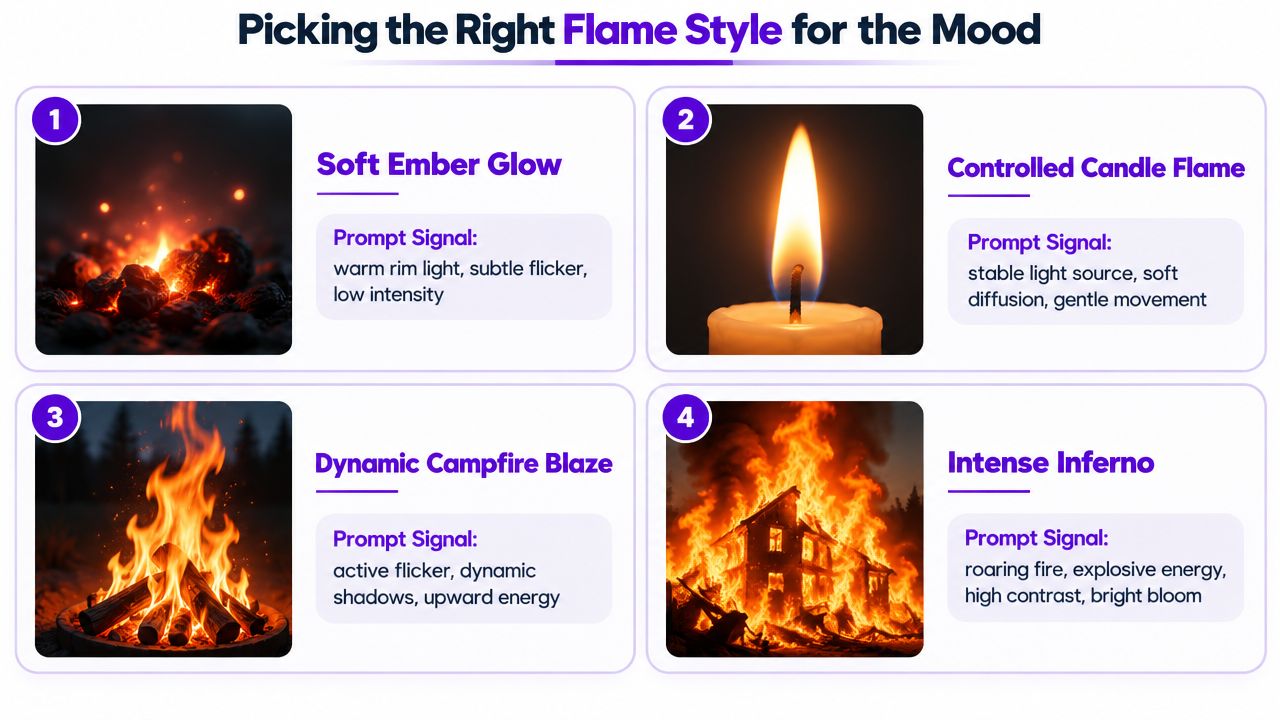
La intensidad del fuego debe coincidir con la función emocional de la imagen. Una brasa contenida puede transmitir melancolía mejor que una pared de fuego, mientras que un póster de fantasía puede necesitar formas gráficas en lugar de humo fotorrealista.
Usa:
luz de realce cálida, brasa única, borde humeante, fondo oscuro
Esta es la opción correcta cuando el sujeto debe sentirse tocado por el calor sin mostrar llamas evidentes. Se adapta a un retrato pensativo, un objeto desgastado o una imagen de portada donde el espacio negativo importa. La frase "borde humeante" implica una combustión lenta, mientras que "brasa única" mantiene el evento visual pequeño.
Prueba:
pequeña llama parpadeante, vela única, bajo contraste, primer plano íntimo
El lenguaje de las velas produce una fuente localizada y legible. Funciona para imágenes de bodegones, escenas románticas, composiciones de mesa y tomas de productos que necesitan calidez sin destrucción. El "bajo contraste" y el "primer plano íntimo" evitan que la llama se convierta en una explosión teatral.
Para un tratamiento de fantasía cinematográfica, utiliza:
llamas imponentes, destellos dinámicos, alto contraste, neblina de calor volumétrica, iluminación de realce dramática
Este prompt crea un evento mucho más grande. El sujeto necesita una silueta clara y suficiente espacio circundante para que el fuego se eleve. Añade una pista de estilo no realista, como "arte conceptual de película de fantasía" o "ilustración cinematográfica estilizada", cuando quieras espectáculo sin un marco de daño fotorrealista.
Usa:
llama pictórica, contornos gráficos, sombreado de celda, estilo de libro de cómic
Este enfoque reemplaza el realismo físico con diseño visual. Es útil para arte de personajes, carteles, conceptos de juegos y gráficos sociales donde la forma y el color de la llama son más importantes que el comportamiento del humo natural.
| Objetivo de la llama | Estado de ánimo útil | Señales del prompt |
|---|---|---|
| Resplandor suave de brasa | Melancolía o contención | "borde humeante", "brasa única", "baja intensidad" |
| Parpadeo de vela | Romance o intimidad | "vela única", "difusión suave", "primer plano" |
| Envuelve por completo | Acción o espectáculo | "llamas imponentes", "alto contraste", "neblina de calor" |
| Quema ilustrada | Drama gráfico | "pictórico", "sombreado de celda", "estilo de libro de cómic" |
Elige una intensidad antes de renderizar. Mezclar lenguaje a escala de vela con lenguaje a escala de infierno a menudo produce un término medio confuso, una llama que no es ni delicada ni dramática.
Una llama plana tiene un patrón de fallo reconocible. Termina en un recorte duro, no proyecta luz, produce humo sin dirección y se sitúa encima del sujeto en lugar de ocupar el mismo espacio. El lenguaje de composición soluciona esos problemas describiendo la interacción entre los elementos.
Añade:
halo brillante, borde de llama suave, caída de degradado
Un halo brillante sugiere calor concentrado. Un borde suave evita que la llama parezca una pegatina. La caída de degradado le indica al modelo que la iluminación se debilita a medida que se aleja de la fuente. En la tela, pide "luz cálida que se desborda en los pliegues". En la piel, prueba con "luz de rebote naranja en la mejilla y el cuello". En el metal, usa "pequeños reflejos de llama reflejada".
La temperatura del color crea profundidad. Combinasombras ambientales fríasconnúcleos de llamas rojo anaranjadocuando buscas un aspecto cinematográfico con base real. Un fondo azul negruzco contra un fuego naranja intenso separa al sujeto y ayuda a que la llama se lea como una fuente de luz en lugar de una forma pintada. Una llama monocromática y un sujeto monocromático pueden funcionar, pero esa combinación empuja intencionalmente la imagen hacia la estilización.
El humo necesita una trayectoria. Usa:
humo direccional que se desplaza hacia arriba y a la izquierda, jirones finos en la base de la llama
La frase direccional implica viento o flujo de aire. «Jirones finos» mantiene la base legible en lugar de enterrar al sujeto en una nube gris. Si la escena debe sentirse estática, reemplaza el movimiento direccional por «columnas de humo delicadas y verticales». Si debe sentirse turbulenta, pide «senderos de humo rotos que se alejan torciéndose de la llama».
La distorsión por calor proporciona otra señal física:
brillo volumétrico, neblina de calor sobre la llama, reflejos elevados en las superficies más cercanas
Estas señales funcionan mejor cuando se usan con moderación. Demasiada neblina puede suavizar los bordes del producto o distorsionar los rasgos faciales. La herramienta Editar es particularmente útil aquí. Superpone un aviso (prompt) de llamas sobre una renderización base estable, pinta únicamente la región del fuego y mantén la pose del sujeto sin cambios entre iteraciones. Intercambia la intensidad de las llamas, la densidad del humo o la paleta, pero no alteres la composición subyacente al mismo tiempo.
Un efecto de fuego se siente integrado cuando cambia la luz a su alrededor, no solo los píxeles dentro de la llama.
Para campañas que necesiten un tratamiento animado más adelante, los mismos principios se transfieren al diseño de movimiento. Un equipo que compareempresas de gráficos en movimientodebe preguntar si el tratamiento final puede preservar la dirección de las llamas, la caída del resplandor, la continuidad del humo y la legibilidad del sujeto en todos los fotogramas. Una imagen fija convincente se construye a partir de la misma lógica visual que una secuencia convincente.
La suposición de que una aplicación de imágenes de IA representará cualquier frase literal sobre fuego es incorrecta. Las indicaciones que representan a una persona real o fotorrealista quemándose activamente pueden ser rechazadas o difuminadas, y una redacción directa como «persona en fuego», «humano envuelto» o «víctima quemada» probablemente activará un filtro de seguridad.
Eso no significa que tengas que abandonar la idea creativa. Significa que debes enmarcar al sujeto como una representación dirigida artísticamente en lugar de una representación de daño real.
Usa uno de estos anclajes:
Luego, añade una pista de estilo como «pictórico», «ilustración gráfica», «renderizado 3D» o «fotograma cinematográfico de una película de fantasía». Estos términos aclaran que la imagen pertenece a un mundo visual imaginario.
El fuego en un elemento de fondo es diferente al fuego que consume un rostro humano fotorrealista. Las llamas en un objeto, una ilustración estilizada o la iluminación de contorno en un retrato en pose generalmente comunican el efecto visual sin representar a una persona real en peligro activo. Una prueba de figura de cera es un filtro editorial útil:
Si la indicación sigue funcionando cuando la cambias por «figura de cera», la dirección artística probablemente sea lo suficientemente específica como para seguir siendo representativa.
Esto no es una garantía, y los filtros pueden responder a toda la indicación en lugar de a una sola frase. Revisa lapolítica de contenido de starryaiantes de probar un caso límite, especialmente cuando se trata de un parecido humano realista, lesiones o una escena destructiva.
Una reescritura práctica podría cambiar «mujer en llamas» por:
retrato pintado y estilizado de una figura de cera, rodeada de elegantes llamas naranjas, cálida luz de contorno, fondo oscuro de galería, arte fantástico cinematográfico
El resultado aún puede ofrecer calor, brillo y dramatismo. Elimina la implicación de que una persona real está sufriendo daños.
Usa este breve resumen antes de cada renderizado:
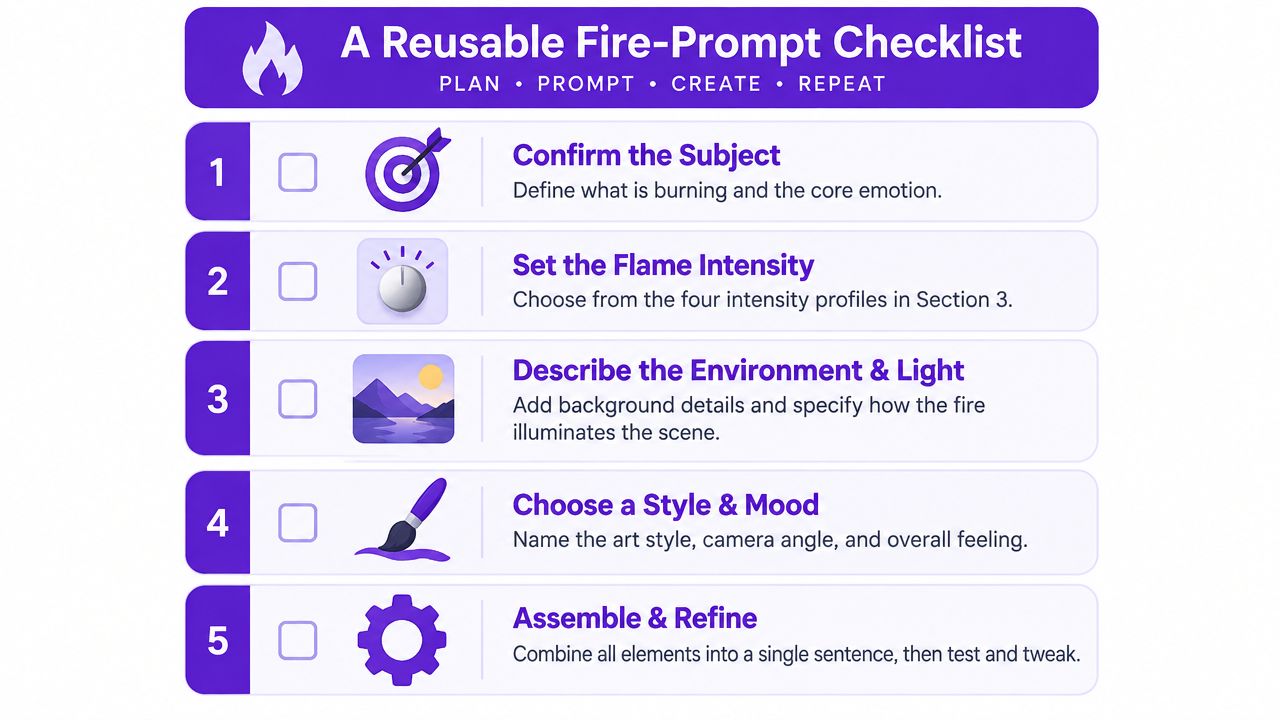
Una plantilla reutilizable podría ser:
[sujeto y pose], [comportamiento y dirección de la llama], [paleta], [luz en las superficies circundantes], [humo y atmósfera], [estilo], [estado de ánimo]
Para un retrato seguro:
retrato de figura de cera posando, pequeñas llamas lamiendo y trazando la silueta exterior, paleta cálida de color ámbar anaranjado con sombras azuladas frías, luz de realce suave en el rostro, humo delgado ascendiendo por detrás, estilo de fantasía cinematográfica pictórica, estado de ánimo dramático y controlado
Para un producto:
zapatilla sobre pedestal negro, anillo de fuego controlado que asciende en la base, fuego anaranjado ámbar con un centro blanco incandescente, brillo inferior amarillo sodio en la suela y la plataforma, chispas de ascuas dispersas, estilo de fotografía editorial de productos, estado de ánimo prémium enérgico
Ejecuta dos o tres iteraciones, cambiando una variable a la vez. Si el fuego es demasiado débil, aumenta su frase de comportamiento. Si abruma al sujeto, reduce la cobertura y fortalece la señal de iluminación en su lugar.
starryai te permite crear y editar elementos visuales a partir de indicaciones de texto, imágenes cargadas y bocetos, lo que lo hace adecuado para probar tratamientos de llamas controladas sin tener que reconstruir toda la composición cada vez. Visitastarryaipara comenzar con un retrato, una imagen de producto o un concepto de personaje, y luego utiliza la herramienta de edición para refinar la ubicación, la intensidad, la paleta y la atmósfera de las llamas.


.svg)