

Écrit parMo Kahnle


Les meilleures idées de générateurs d'images IA ne commencent pas par un style visuel. Elles commencent parun public spécifique, un format de publication et la fonction que l'image doit remplir. Une transformation TikTok nécessite un visage reconnaissable et une forte révélation. Une couverture de livre a besoin d'un espace négatif pour la typographie. Un graphique de produits dérivés nécessite des bords nets, un placement délibéré et un design qui fonctionne toujours une fois imprimé.
Cette distinction est importante car la génération d'images par IA a évolué au-delà de la nouveauté de recherche. Grand View Research estime le marché mondial des générateurs d'images IA à555,1 millions de dollars USD en 2026, contre349,6 millions de dollars USD en 2023, avec une projection de1 081,2 millions de dollars USD d'ici 2030et unTCAC de 17,7 % de 2024 à 2030 (Analyse de marché de Grand View Research). La création moderne a également une histoire claire, de DALL·E en janvier 2021 à la sortie des poids ouverts de Stable Diffusion le 22 août 2022, suivie par DALL·E 3 dans ChatGPT et la génération d'images native dans GPT-4o (Chronologie de la génération d'images et de vidéos par IA).
Les10 idées de générateurs d'images IAsuivantes sont organisées autour de flux de travail réels, notamment la création sur TikTok, les transformations personnelles, les produits dérivés, l'édition, les jeux vidéo, les campagnes saisonnières et les communautés de niche. Utilisez cette formule d'invite comme point de départ :sujet, décor, ambiance, palette, composition et objectif de sortie. starryai rend ce processus accessible grâce à des invites textuelles, des selfies et des emojis, mais les œuvres générées peuvent toujours nécessiter une révision, des corrections de typographie, un recadrage ou un post-traitement avant une utilisation commerciale ou éditoriale.
Un tableau d'ambiance fort donne à votre public une raison visuelle de reconnaître votre travail avant même de lire votre nom d'utilisateur. Au lieu de demander « un joli art esthétique », définissezla palette, l'atmosphère, l'éclairage, la tonalité émotionnelle et l'utilisation prévue. Un créateur TikTok peut créer un flux onirique lavande et or, tandis qu'un vendeur Etsy peut créer des scènes de produits assorties pour une collection de bougies.
Essayez une invite telle que :
« Intérieur lavande rêveur et or antique, lumière douce de fenêtre, ambiance vintage éthérée, grain de film subtil, fleurs séchées, composition centrée, illustration verticale pour les réseaux sociaux. »
Pour plus de contrôle, faites référence à descouleurs Pantone ou des codes hexadécimaux spécifiqueslorsque l'outil les gère de manière fiable. Utilisez deux ou trois adjectifs d'ambiance, tels que « éthéré, vintage, ténébreux », plutôt d'empiler une longue liste de styles vaguement liés. L'objectif est un système visuel reproductible, et non une seule image impressionnante.
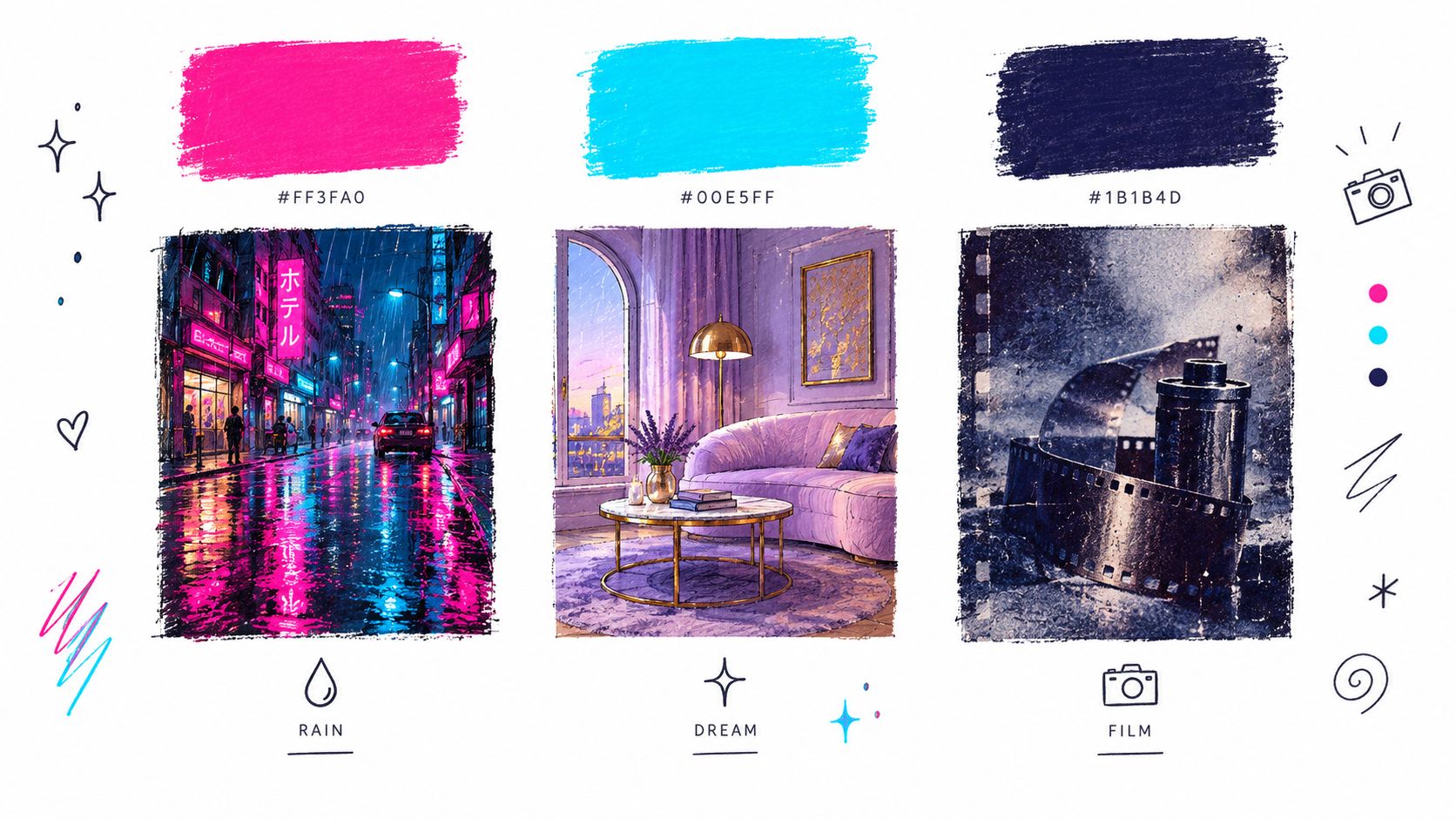
Gardez les ingrédients esthétiques fixes tout en changeant de sujet. Générez un portrait, une scène de bureau, un plan à plat de produit et un arrière-plan de citation en utilisant la même palette et le même éclairage. Dans starryai, enregistrez la combinaison de prompts qui produit la bonne atmosphère, puis réutilisez-la avec un nouveau sujet et une nouvelle taille de toile.
Le compromis réside entre la cohérence et la flexibilité. Une palette stricte peut donner un aspect professionnel à un flux, mais elle peut aussi rendre chaque publication interchangeable. Modifiez une variable à la fois, telle que le sujet, l'angle de la caméra ou la météo, afin de savoir quel ingrédient a créé l'amélioration.
Le développement de personnages fonctionne mieux en tant que processus itératif. Commencez par une description de base détaillée, puis créez des variations contrôlées pour les vêtements, l'expression, l'équipement et le décor. Cela donne à un auteur indépendant une référence visuelle pour un protagoniste, à un développeur de jeux un point de départ pour des concepts de PNJ, et à un joueur de RPG une direction utile pour sa feuille de personnage.
Commencez par un prompt comme :
« Une femme sud-asiatique de trente ans avec une corpulence athlétique, des boucles noires mi-longues, une cicatrice en croissant au-dessus de son sourcil gauche, une expression calme et observatrice, une veste pratique en charbon de bois, un concept de personnage en pied, fond de studio neutre.
Ensuite, créez des variations en utilisant des changements précis :
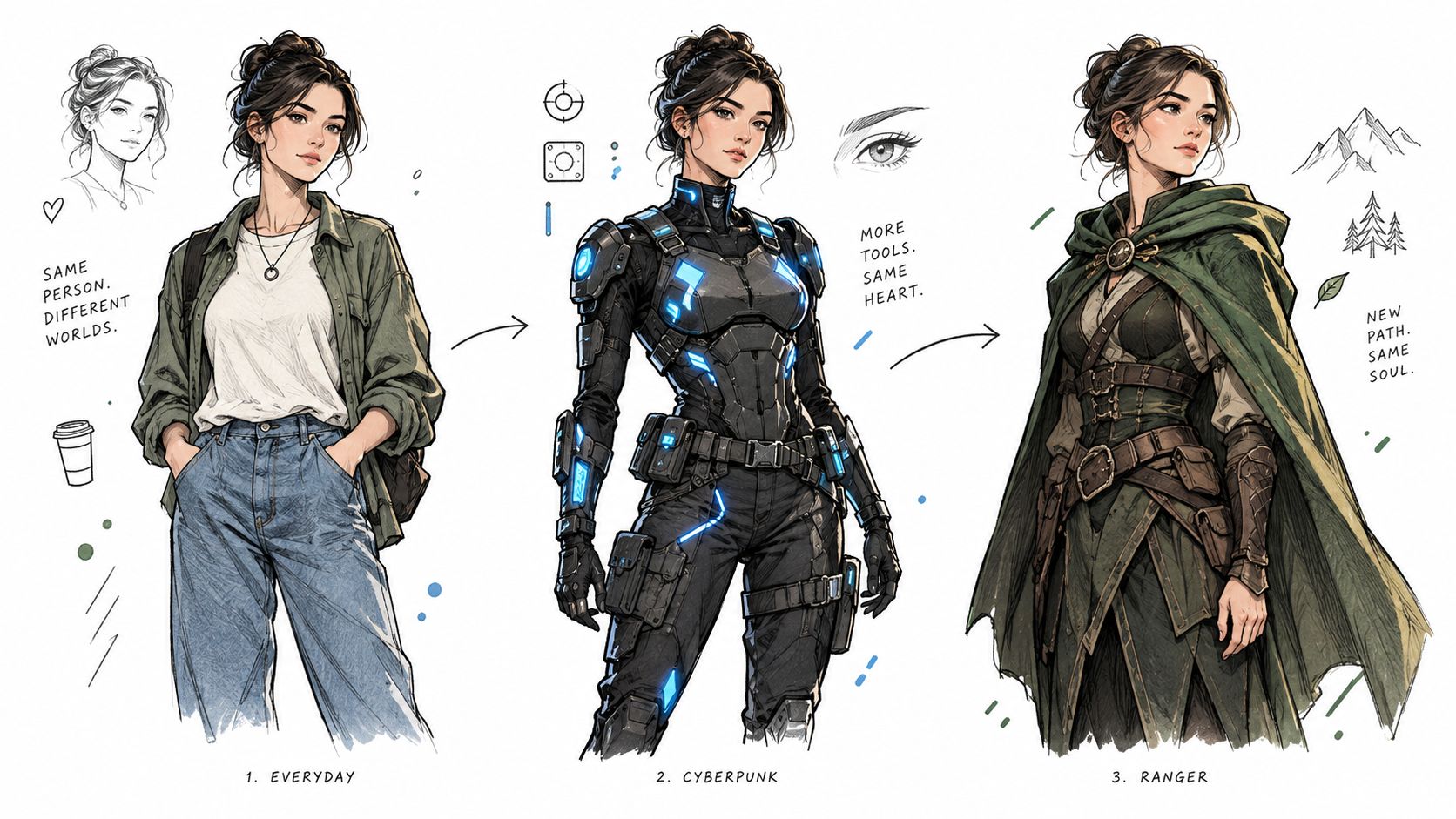
Le langage « même personnage » peut aider, mais il ne garantit pas une parfaite cohérence de l'identité. Répétez les détails distinctifs dans chaque prompt et comparez les générations côte à côte. Dans starryai, gardez la formulation des prompts réussie à portée de main pendant que vous testez les costumes, les expressions et les compositions.
Règle pratique :Traitez chaque génération comme une exploration de design, et non comme une feuille de modèle finale.
Les références de personnages sont utiles pour la planification, mais les éditeurs et les équipes de jeux doivent vérifier la ressemblance, la continuité visuelle et les droits avant de les utiliser publiquement. Un visage généré peut dériver d'une scène à l'autre, et de petits détails tels que l'âge, la morphologie ou l'origine ethnique peuvent changer à moins que vous ne les indiquiez clairement.
Les visuels basés sur les tendances fonctionnent lorsqu'ils combinent une esthétique familière avec un angle personnel. Le « Cottagecore » seul est large. « Vidéo musicale indépendante cottagecore, cuisine vert mousse, robe en dentelle faite main, guitare acoustique personnalisée, brume matinale douce » donne au générateur un sujet, un décor et un narratif.
Les mashups utiles incluentdes intérieurs grandmiliaire avec le selfie d'un créateur, le Barbiecore avec l'academia sorcière, ou la dark academia avec la mode Y2K. Ajoutez un détail personnel, tel qu'un instrument de musique préféré, une coiffure, un animal de compagnie, un loisir ou un accessoire reconnaissable. Ce détail aide l'image à ressembler à l'interprétation d'un créateur plutôt qu'à un tableau de tendances générique.
Une seule publication peut attirer l'attention, mais une série répétable donne aux téléspectateurs une raison de revenir. Gardez le concept constant et variez la transformation :
Utilisez les sons tendances comme des invites créatives, mais ne présumez pas que le son lui-même fera performer une image. Les tendances TikTok changent rapidement, le concept visuel doit donc être compréhensible sans contexte. Pour la planification spécifique aux plateformes, ceguide sur les générateurs d'images IA pour TikTokpeut aider à connecter les idées de prompts à du contenu court.
Le compromis réside entre la vitesse et l'originalité. Publier rapidement peut vous aider à participer à une tendance en direct, mais copier son apparence superficielle ne construira pas une identité de créateur distincte. Ajoutez une signature visuelle récurrente, telle qu'un dispositif de cadrage, un accent de couleur ou un détail de personnage.
Les transformations de selfie ont un avantage immédiat : le public peut comparer l'image source avec le résultat. Cette structure avant-après crée une histoire claire pour TikTok, Instagram ou une expérience créative personnelle. Un selfie bien éclairé peut devenir un guerrier elfe fantastique, une star de cinéma glamour des années 1920, un hacker cyberpunk ou un personnage d'une réalité alternative.
Utilisez un prompt qui décrit à la fois l'identité et la transformation :
« Transforme ce selfie en un guerrier elfe fantastique confiant, cheveux tressés argentés, armure en cuir vert forêt, forêt ancienne au clair de lune, éclairage de contour cinématique, expression déterminée, portrait détaillé. »
Pour de meilleurs résultats, utilisez un selfie clair avec des traits du visage visibles et une obstruction minimale. Décrivez l'époque, les vêtements, l'ambiance, l'éclairage et le cadrage de la caméra. « Fais-moi paraître cool » donne trop de liberté au générateur. « Star de cinéma des années 1920, robe de soirée en satin, hôtel art déco, éclairage de studio doux, élégant portrait aux trois quarts » lui donne un briefing utilisable.
Générez plusieurs versions d'un même concept plutôt que de sauter entre des transformations sans rapport. Essayez un portrait d'ère de méchant, une version héroïque et une interprétation détendue des coulisses. Gardez le visage et le thème central stables tout en changeant le décor ou le costume.
Le flux de travail pour les selfies de starryai est particulièrement pertinent pour ce format, et songénérateur d'images IA pour créer des images de vous-mêmeoffre un point de départ naturel pour les concepts de transformation. Examinez chaque résultat pour détecter les distorsions faciales, les accessoires indésirables et les modifications susceptibles de fausser l'image de la personne.
Le compromis réside entre le spectacle et l'authenticité. Les retouches fantastiques sont amusantes, mais une transformation qui préserve une expression reconnaissable ou un détail personnel est souvent plus captivante qu'un portrait de personnage totalement générique.
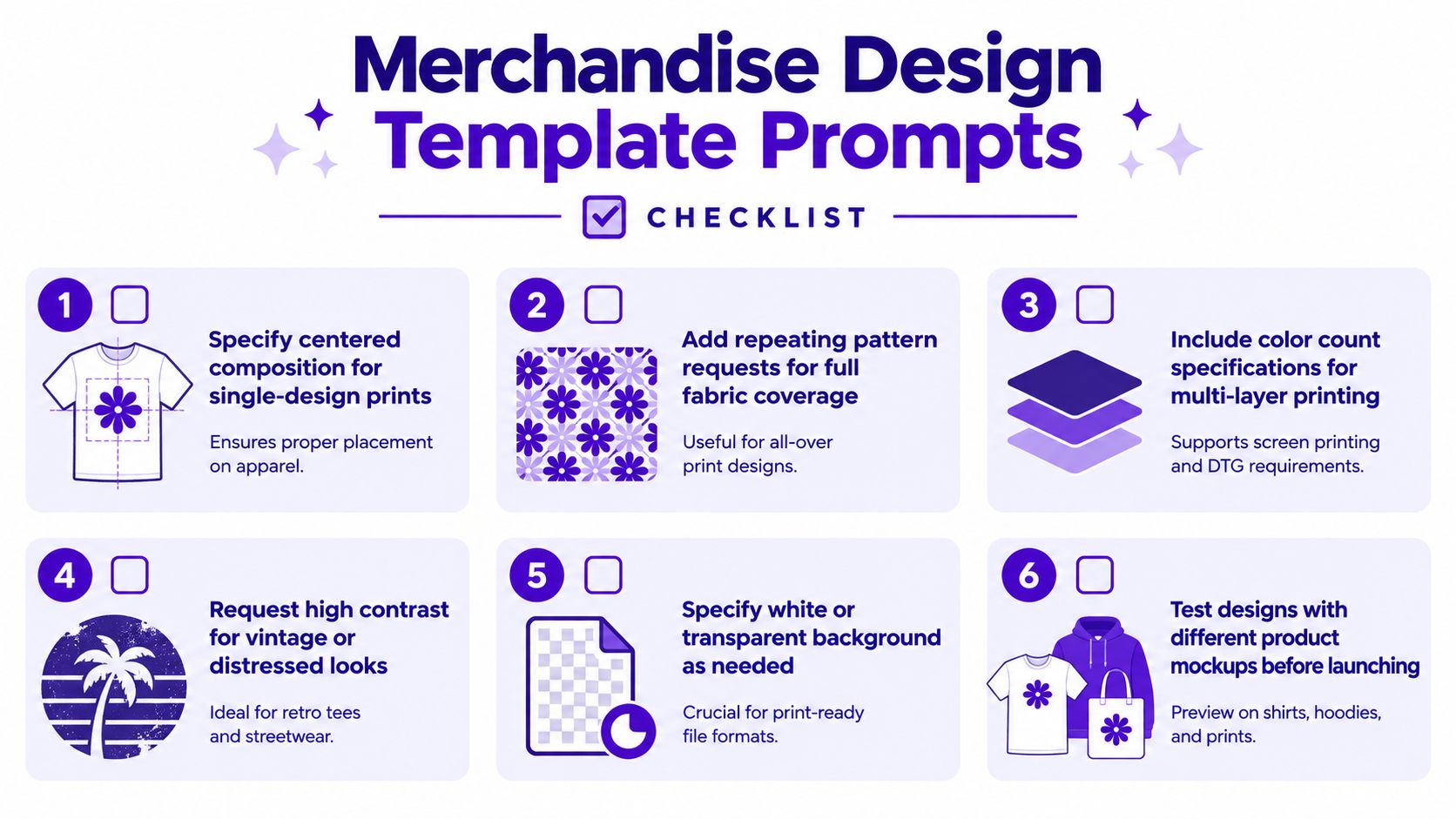
Les instructions pour les produits dérivés doivent décrire unemise en page d'impression, pas seulement une illustration. Indiquez au générateur où l'œuvre doit se placer, de combien d'espace visuel elle a besoin, et si elle doit devenir un graphique centré, un motif répétitif ou une maquette de produit.
Pour le design d'un t-shirt, essayez :
« Couronne florale de croissant de lune avec des papillons de nuit et de petites étoiles, composition centrée pour un t-shirt en coton noir, formes audacieuses à fort contraste, palette de couleurs limitée, contour net, pas de texte, fond blanc. »
Pour du tissu, changez l'objectif :
« Motif répétitif sans raccord de croissants de lune, de fleurs sauvages et de papillons de nuit, espacement équilibré, palette bleu minuit et or mat, design textile plat. »
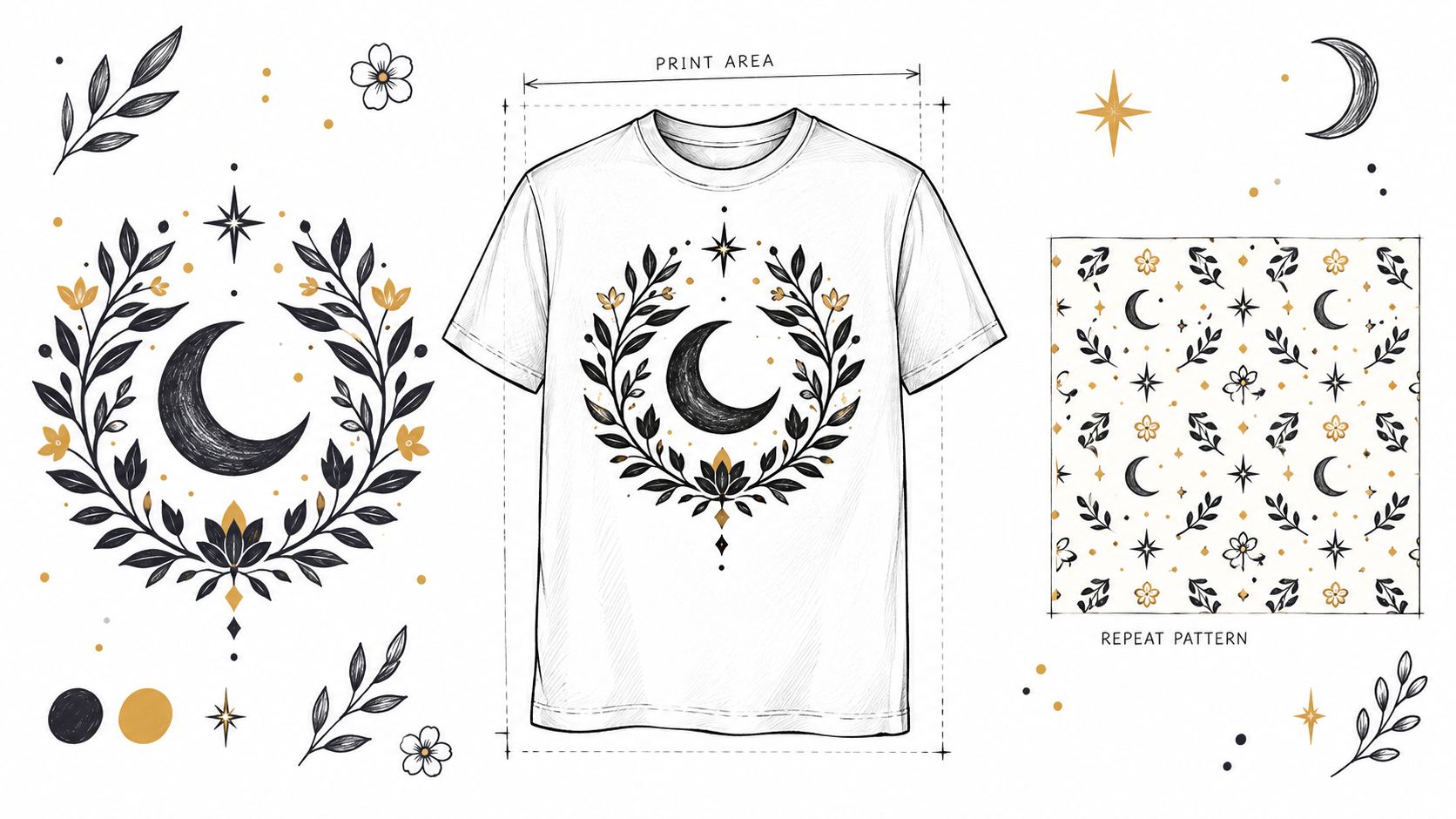
Demandez un fond blanc ou transparent le cas échéant, mais inspectez le fichier réel avant de le télécharger sur une plateforme d'impression à la demande. Les outils d'IA peuvent créer des maquettes attrayantes qui ne sont pas des œuvres prêtes pour la production. Le texte, les bords complexes, les lignes fines et les petits détails décoratifs nécessitent souvent un nettoyage manuel.
Un briefing d'instruction pratique peut inclure :
starryai peut aider les vendeurs d'Etsy et les entrepreneurs secondaires à explorer rapidement une collection. Sesidées de design de produits dérivésfournissent des orientations supplémentaires pour transformer une niche large en un ensemble coordonné de produits.
Le compromis se situe entre le détail créatif et la netteté de l'impression. Une image dense peut paraître riche à l'écran mais boueuse sur du tissu. Commencez par un design phare, testez-le dans une maquette réaliste, et ce n'est qu'alors que vous élargirez la collection.
Les séquences d'emojis fonctionnent comme des briefs créatifs compacts pour les créateurs qui ont rapidement besoin d'un point de départ. 🌙✨🗡️👸 peut suggérer une princesse guerrière au clair de lune, tandis qu'une courte phrase définit le sujet, le décor et le traitement visuel.
Essayez :
« 🌙✨🗡️👸, une princesse guerrière au clair de lune debout sur une falaise au-dessus d'un royaume lumineux, fantaisie céleste, palette indigo et argent, nuages dramatiques, composition héroïque en pied. »
Construisez l'instruction par couches : des emojis pour les ingrédients de l'histoire, une phrase-sujet pour l'interprétation, une ambiance pour la direction émotionnelle et des détails de composition pour le cadrage. La même séquence peut produire des résultats distincts si vous changez l'ordre. Commencez par la couronne pour un portrait royal, l'épée pour une scène d'action, ou la lune pour une image atmosphérique calme. Quatre à six emojis fournissent généralement suffisamment de matière pour un récit sans surcharger le concept.
Les instructions par emojis conviennent aux défis d'audience, aux publications communautaires et au développement rapide de concepts. Un créateur peut inviter ses abonnés à soumettre quatre emojis, puis interpréter chaque soumission dans un style visuel partagé. Un joueur de jeu de rôle sur table peut combiner des emojis d'ambiance avec une phrase de personnage ou de décor pour explorer une histoire de fond ou une scène de rencontre.
starryai accepte les saisies basées sur des emojis, offrant aux créateurs un point de départ pratique lorsque la rédaction d'une instruction détaillée semble lente. Ses outils de texte et d'édition peuvent ensuite affiner le sujet, l'ambiance ou la composition. Le compromis est la prévisibilité. Les significations des emojis varient, ajoutez donc une phrase de clarification chaque fois que des résultats cohérents importent.
Enregistrez les combinaisons d'emojis réussies avec leurs paramètres de style. Cet historique devient une bibliothèque d'instructions réutilisable pour les défis récurrents, les publications saisonnières et la participation du public. Testez une seule variation à la fois afin de pouvoir identifier quel emoji, quel ordre ou quelle phrase descriptive a modifié le résultat.
Une instruction solide pour une couverture de livre a deux missions : signaler le genre et laisser au designer de la marge de manœuvre pour construire la mise en page visible en rayon. Définissez la promesse au public, le sujet focal, le contraste, la palette, l'ambiance et l'espace négatif avant de nommer un style de rendu.
Pour un auteur de fantasy indépendant, utilisez :
« Illustration de couverture de livre de fantasy atmosphérique, femme rôdeuse solitaire tenant une lanterne au bord d'une forêt ancienne, ville lointaine en ruines, palette vert émeraude et bronze profond, ambiance mystérieuse et pleine d'espoir, zone supérieure dégagée pour la typographie du titre, pas de mots. »
Pour la romance, décrivez la relation et la promesse émotionnelle plutôt que de changer seulement la couleur :
« Illustration de couverture de romance contemporaine, deux mains tendues à travers la vitre d'un café striée de pluie, palette terracotta chaude et crème, ambiance intime et optimiste, foyer central épuré, espace généreux pour le titre et le nom de l'auteur, pas de texte.
L'image de marque d'une série dépend de décisions visuelles reproductibles. Maintenez la famille de couleurs, le cadrage, le traitement des symboles et le niveau de réalisme cohérents tout en changeant le sujet central. Générez des placements focaux à gauche, au centre et au tiers inférieur pour qu'un designer puisse tester les positions du titre et du nom de l'auteur.
Gardez le lettrage hors de l'instruction de génération. Le texte généré par l'IA peut comporter des fautes d'orthographe, être déformé ou difficile à modifier. Créez l'œuvre sans mots, puis ajoutez la typographie dans un outil de mise en page avec un contrôle sur le choix des polices, l'espacement, la hiérarchie et l'accessibilité. Dans starryai, utilisez une instruction textuelle détaillée pour tester des concepts de couverture, puis affinez la composition avec ses outils d'édition avant de confier l'œuvre à un designer.
Enregistrez les composants gagnants de l'instruction sous forme de brief de série. Le même langage visuel peut guider les bannières d'auteur, les briques publicitaires pour les réseaux sociaux, les en-têtes de bulletins d'information et les présentations de personnages. Recherchez des livres comparables pour comprendre les attentes du genre, tout en évitant les designs de couverture reconnaissables ou le style signature d'un artiste vivant.
Traitez chaque couverture générée comme un projet d'actif. Vérifiez la cohérence de l'identité, les détails culturels, le symbolisme et les droits avant la publication. Aux États-Unis, les images purement générées par machine ne sont généralement pas protégées par le droit d'auteur, tandis qu'une édition, une sélection, un arrangement ou une modification significatifs créés par l'humain peuvent protéger ces contributions créées par l'homme. Lavue d'ensemble du droit d'auteur de CapCutrésume cette distinction et note qu'une instruction seule ne suffit pas à établir la propriété.
Les visuels de jeux ont besoin d'une différenciation fonctionnelle. Un avatar de joueur doit rester reconnaissable à la taille d'affichage prévue, tandis qu'une bibliothèque de PNJ nécessite des distinctions claires entre les rôles, les factions et l'équipement. Une feuille de personnage de jeu de rôle sur table bénéficie d'un portrait lisible, d'un objet fétiche et d'une pose qui communique sa personnalité.
Pour un avatar de RPG de fantasy, écrivez :
« Avatar de rôdeur demi-elfe pour RPG sur table, morphologie svelte et athlétique, cheveux sombres tressés, cape verte patinée, arc recurve, compagnon renard, expression alerte, portrait de fantasy pictural, palette forestière mate, composition de profil circulaire. »
Pour un projet rétro, modifiez les exigences de rendu :
« Sprite de marchand de donjon en pixel art, petite taille, sacoche surdimensionnée, lunettes en laiton, tunique orange chaleureuse, pose neutre de face, palette limitée, fond transparent. »
Mentionnez directement le langage visuel souhaité, tel que le pixel art, l'aquarelle, l'illustration d'inspiration anime, le concept 3D low-poly ou l'art de jeu indépendant peint à la main. Incluez la classe, le rôle, l'équipement, les couleurs caractéristiques et une pose. Pour l'intégration 3D, demandez des références de face, de profil et de dos, mais prévoyez un flux de travail de modélisation et de nettoyage distinct.
Les streamers Twitch peuvent créer des avatars, des concepts d'alertes et des arrière-plans de chaîne autour du même personnage. Les communautés Discord peuvent offrir à leurs membres des icônes associées mais distinctes en conservant un style artistique fixe et en variant les symboles ou les accents de couleur.
Le principal compromis réside entre le détail expressif et l'utilisabilité. Un portrait très détaillé peut être superbe dans une bannière de profil mais perdre son identité lorsqu'il est réduit à une petite icône. Générez l'image au format prévu par la plateforme, puis testez le résultat à la taille où les spectateurs la verront.
Évitez de demander des personnages de jeux protégés par le droit d'auteur lorsqu'un nouveau personnage original remplirait la même fonction. « Mage de givre en armure avec un bâton en cristal fissuré » vous donne une direction utilisable sans dépendre de l'identité d'une franchise reconnaissable.
Les images saisonnières fonctionnent parce qu'elles relient une ambiance visuelle à une activité d'actualité. Un prompt utile nomme la saison, la météo, les objets, la palette, l'éclairage et l'action du public. « Automne » est trop large. « Coin lecture cottagecore d'automne chaleureux, couverture orange brûlé, tasse en céramique vert sauge, citrouilles près d'une fenêtre striée de pluie, lumière de lampe chaleureuse, publication sociale verticale » donne au générateur une scène complète.
Construisez des variations autour de la même marque :
Le contenu saisonnier bénéficie d'une préparation en amont car vous pouvez examiner les images, les adapter à différentes plateformes et remplacer les générations faibles avant la période de publication de pointe. Conservez les ingrédients clés de la marque stables afin qu'une publication de vacances ressemble toujours à celle de votre compte.
Une petite entreprise peut utiliser un prompt saisonnier pour l'arrière-plan d'un produit, un autre pour un en-tête d'e-mail et un troisième pour une annonce sur les réseaux sociaux. Un créateur peut réutiliser le même personnage en automne, en hiver, au printemps et en été pour transformer des publications isolées en une série visuelle.
Le compromis réside entre la familiarité et la nouveauté. Les citrouilles, la neige, les fleurs et les scènes de plage communiquent rapidement, mais elles peuvent sembler interchangeables. Ajoutez un détail personnel ou communautaire spécifique, tel qu'une tradition locale, une activité favorite, un produit distinctif ou une mascotte récurrente.
Vérifiez le contexte culturel avant de publier des images de fêtes. Les symboles saisonniers ne sont pas universels, et une spécificité respectueuse vaut mieux que de mélanger des références sans rapport dans une seule scène décorative.
Les communautés de niche réagissent aux détails que les initiés reconnaissent. Une communauté de sorcellerie peut se connecter à une table de tarot soigneusement composée, à des motifs lunaires, à des herbes séchées et à des textures faites main. Un public darkwave peut préférer une architecture monochrome austère, un grain analogique, des silhouettes dramatiques et un néon sobre plutôt qu'une image « gothique » générique.
Commencez par le langage visuel de la communauté, puis ajoutez un objectif clair :
« Portrait inspiré d'un album darkwave, silhouette solitaire sous des arches en béton brutaliste, vêtements noirs et charbon, lumière bleu électrique retenue, grain de film analogique, humeur introspective, illustration sociale carrée. »
Pour le cottagecore, vous pourriez utiliser :
« Cuisine cottagecore maximaliste, herbes débordantes, céramiques dépareillées, rideaux brodés, vieilles cartes de recettes, lumière chaude de l'après-midi, atmosphère artisanale et vécue, photographie d'intérieur éditoriale.
Prenez le temps d'observer les espaces communautaires avant d'écrire des prompts. Remarquez les objets, le langage, les références et les valeurs que les gens utilisent eux-mêmes. Un visuel de sorcellerie ne doit pas réduire une pratique vivante à des cristaux aléatoires, et une image inspirée des anime ne doit pas aplatir une vaste communauté en un seul costume.
Les variations utiles incluent :
Le compromis réside entre la spécificité et la portée. Une image hautement spécialisée peut signifier moins pour un public général, mais elle peut créer une reconnaissance plus forte parmi les personnes que vous souhaitez le plus atteindre. Évitez les stéréotypes, citez vos sources le cas échéant et invitez les commentaires de la communauté au lieu de traiter une niche comme une tendance jetable.
Les idées de générateurs d'images par IA les plus utiles sont celles que vous pouvez répéter sans produire la même image à chaque fois. Choisissezun public, définissezun formatet décidez de ce que l'image doit accomplir. Un créateur TikTok peut choisir des portraits de transformation personnelle dans un format vertical. Un auteur indépendant peut choisir une illustration de couverture centrée sur les personnages avec un espace négatif pour la typographie. Un vendeur Etsy peut choisir des graphismes centrés et à fort contraste pour des vêtements.
Écrivez un prompt de base avec les six composantes principales :
Créez ensuitetrois variations contrôlées. Conservez cinq composants fixes et modifiez-en un seul. Par exemple, préservez le personnage, la palette, l'ambiance et la composition tout en testant un décor de forêt, de ville ou de studio. Ou conservez la scène du produit tout en changeant l'éclairage, passant d'une lumière douce de jour à une lumière spectaculaire de fin de journée.
Modifiez une seule variable à la fois.Sinon, vous ne saurez pas quel ingrédient du prompt a amélioré le résultat.
Enregistrez les ingrédients de prompts qui fonctionnent, notamment les descriptions de sujets distinctives, le vocabulaire lié aux palettes, les termes d'éclairage, les angles de caméra et les exigences négatives telles que « pas de texte » ou « arrière-plan épuré ». Une bibliothèque de prompts réutilisables vous aide à créer des collections, des couvertures de séries, des personnages récurrents et des campagnes saisonnières sans repartir d'une page blanche.
Examinez chaque génération avant de la publier. Vérifiez si la composition est adaptée à la plateforme, si les visages et les mains ont l'air cohérents, si les détails du produit sont précis et si le texte reste lisible. Pour les couvertures de livres et les produits dérivés, ajoutez la typographie séparément chaque fois que possible. Pour les ressources de jeux, testez l'image à sa taille d'affichage réelle et confirmez que le style artistique correspond au reste du projet.
L'utilisation commerciale et éditoriale nécessite également un examen des droits. Aux États-Unis, les images purement générées par machine ne bénéficient pas d'une protection par le droit d'auteur, tandis qu'une modification, une sélection, un arrangement ou une intervention humaine significative peuvent protéger les contributions d'origine humaine (directives sur le droit d'auteur pour les images générées par IA). Votre flux de travail doit documenter les décisions créatives que vous prenez, conserver les fichiers d'origine et vérifier les conditions applicables à l'outil, à la plateforme, aux collaborateurs et à l'utilisation prévue.
starryai facilite l'expérimentation rapide avec des prompts textuels, des selfies et des emojis, ce qui s'avère utile pour tester des concepts avant de vous engager dans un flux de travail de conception plus vaste. L'actif final peut encore nécessiter un recadrage, un nettoyage, une typographie, une correction des couleurs, une révision de l'identité ou une autre passe d'édition. Une génération rapide est précieuse, mais c'est un système reproductible qui transforme une image intéressante en une production créative utile.
| Type de prompt | Complexité de mise en œuvre 🔄 | Besoins en ressources ⚡ | Résultats attendus ⭐ / 📊 | Cas d'utilisation idéaux | Principaux avantages / Astuce 💡 |
|---|---|---|---|---|---|
| Prompts pour moodboards esthétiques | 🔄🔄 (modéré, nécessite vision + itérations) | Modéré, références de couleurs (hex/Pantone), exemples d'images, configuration de lots | ⭐⭐⭐, visuels cohérents ; 📊 forte cohérence de marque/flux | Flux de réseaux sociaux, campagnes saisonnières, collections de produits dérivés | Produit une image de marque cohérente ; 💡 utilisez les codes hex/Pantone et enregistrez vos combinaisons de prompts |
| Prompts pour l'évolution de la conception de personnages | 🔄🔄🔄 (élevé, travail de cohérence itératif) | Élevé, description de base détaillée, poses de référence, itérations | ⭐⭐⭐, nombreuses variantes de conception ; 📊 aide au développement de personnages et aux ressources | Auteurs indépendants, développeurs de jeux, jeux de rôle sur table | Génère plusieurs itérations ; 💡 utilisez la formulation « même personnage » |
| Prompts pour mashups de tendances TikTok virales | 🔄🔄 (modéré, recherche de tendances requise) | Faible à modéré, surveillance des tendances, références sonores/de style ; rapide à produire | ⭐⭐⭐, forte viralité ; 📊 visibilité accrue sur l'algorithme (sensible au facteur temps) | Créateurs TikTok, spécialistes du marketing de contenu, influenceurs | Stimule rapidement la portée ; 💡 publiez rapidement au pic de la tendance |
| Prompts pour la transformation de selfies | 🔄🔄 (faible à modéré, transformations en un seul prompt) | Faible, selfie clair, descripteurs de style ; génération rapide | ⭐⭐⭐, très engageant/personnel ; 📊 stimule le partage social et la viralité | Influenceurs, cosplay, défis de transformation | Contenu personnel hautement partageable ; 💡 utilisez des selfies bien éclairés et une époque/un style spécifiques |
| Prompts pour modèles de conception de produits dérivés | 🔄🔄🔄 (modéré à élevé, besoins d'impression techniques) | Élevé, spécifications d'impression, séparabilité des couleurs, maquettes, post-édition possible | ⭐⭐⭐, art prêt pour la production (peut nécessiter des ajustements) ; 📊 accélère la commercialisation | Vendeurs Etsy, entrepreneurs POD, créateurs de produits dérivés | Crée des designs optimisés pour l'impression ; 💡 précise une composition centrée et le nombre de couleurs |
| Prompts d'expansion d'emojis en œuvres d'art | 🔄 (faible, traduction d'entrée simple) | Faible, chaîne d'emojis + clarificateur optionnel ; configuration minimale | ⭐⭐, art conceptnel ludique ; 📊 conversion rapide d'idées en images | Défis sociaux, non-écrivains, conception rapide | Faible barrière à l'entrée ; 💡 utilise 4 à 6 emojis + une phrase de clarification |
| Prompts pour couvertures de livres et image de marque d'auteur | 🔄🔄🔄 (modéré à élevé, besoins du marché et de composition) | Modéré, références de genre, notes de composition, retouche typographique possible | ⭐⭐⭐, couvertures alignées sur le marché (peut nécessiter un post-traitement) ; 📊 accélère les itérations | Auteurs indépendants, éditeurs KDP, petites maisons d'édition | Concepts de couverture économiques ; 💡 garder une composition simple pour la superposition de texte |
| Prompts pour avatars et actifs de jeux | 🔄🔄🔄 (élevé, contraintes de plateforme/style) | Élevé, spécifications de style, vues multiples, préparation de sprites/export, post-traitement | ⭐⭐⭐, utile pour le prototypage ; 📊 accélère la création d'actifs (peut nécessiter une conversion) | Développeurs de jeux indépendants, streamers, joueurs de JDR | Actifs personnalisés rapides ; 💡 demander des vues de face/profil/dos et des références de style |
| Prompts esthétiques saisonniers et de vacances | 🔄🔄 (faible à modéré, planification opportune) | Faible, palettes saisonnières, symboles, création par lots recommandée | ⭐⭐⭐, engagement opportun ; 📊 coup de pouce de l'algorithme pendant les périodes saisonnières | Calendriers de contenu, promos saisonnières e-commerce, influenceurs | Contenu de calendrier prévisible ; 💡 création par lots 4 à 6 semaines avant le pic |
| Prompts pour communautés de niche et sous-cultures | 🔄🔄🔄 (élevé, nuance culturelle requise) | Modéré, immersion dans la communauté, références authentiques, langage soigné | ⭐⭐⭐, fort engagement de niche ; 📊 favorise le partage et la fidélité de la communauté | Créateurs de niche, leaders de communauté, marques de sous-culture | Résonance profonde avec les audiences de niche ; 💡 rechercher les normes de la communauté, éviter les stéréotypes |
Utilise starryai pour transformer des prompts textuels, des selfies et des emojis en concepts visuels pour des séries TikTok, des références de personnages, des produits dérivés, des projets de livres et du contenu communautaire. Commence avec une audience et un format, teste trois variations contrôlées etvisite starryaipour commencer à construire ton prochain système visuel reproductible.


.svg)