

Written by Mo Kahn on
October 9, 2026


You search for anime character maker boy because you need a male character with a distinct face, outfit, and attitude. The first results often look polished but interchangeable: silver hair, dramatic eyes, a school jacket, and no reliable way to reproduce the same person tomorrow. That isn't usually a failure of the generator. It's a prompt-design failure.
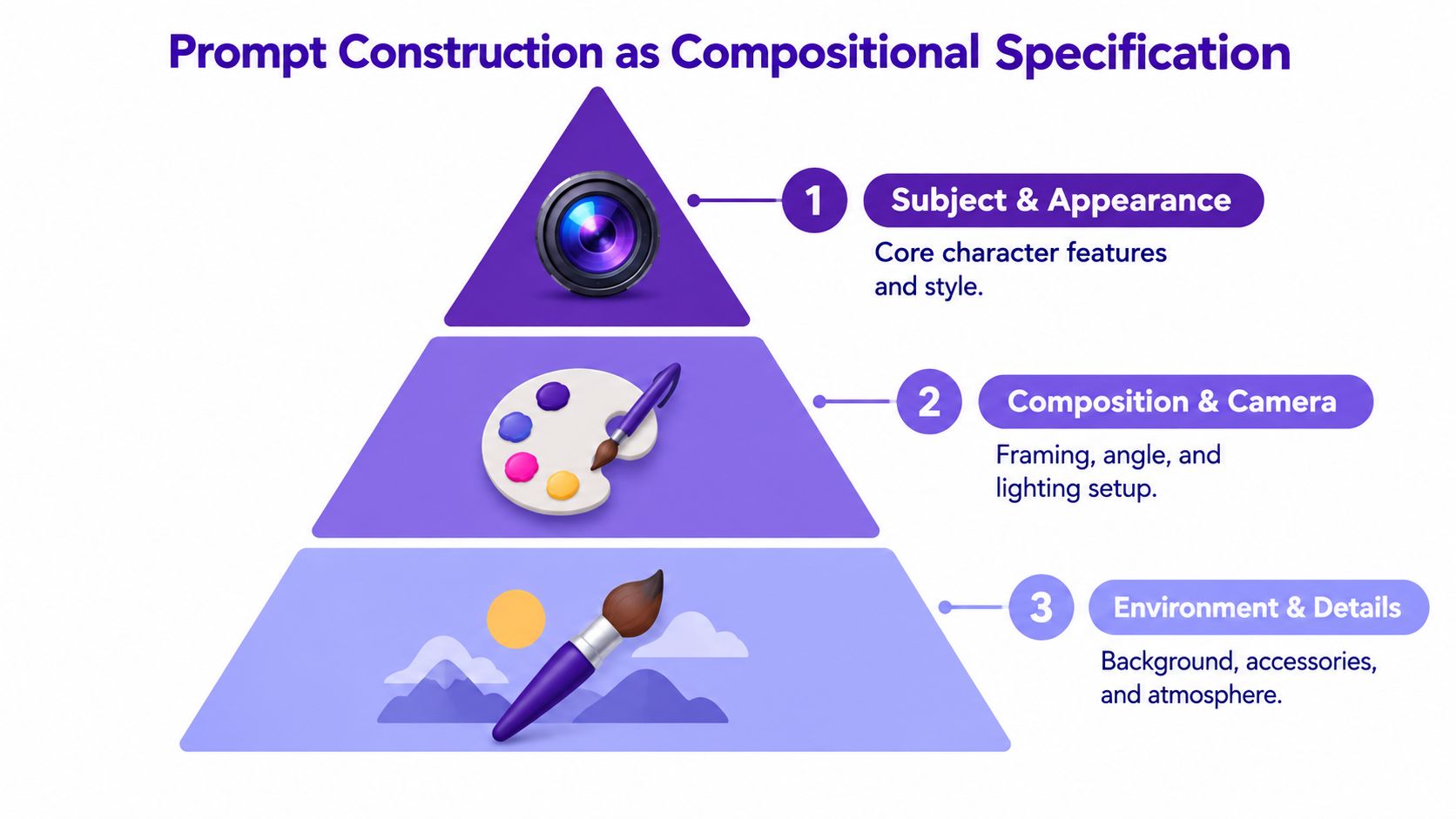
Treat the prompt as a compositional specification, not a piece of creative writing. Lock the character's identity, define relationships in the scene, then control the rendering. With that order, an anime boy can move from a neutral portrait to a TikTok avatar, RPG character sheet, book-cover concept, Etsy design, or game asset without becoming a different character at every pass.
You type “anime character maker boy” into a search bar, choose a promising tool, and describe a confident school protagonist with dark hair, blue eyes, a red scarf, and a sword. The result has the right mood, but the scarf is blue, the sword is missing, and the character's expression suggests a villain. A second attempt fixes the scarf but changes the hairstyle. By the fifth generation, you're no longer designing a character. You're negotiating with randomness.
The practical fix is to separate what the character is from what the character is doing. Identity should remain stable while pose, framing, and environment change. If the character description changes in every prompt, you can't tell whether a new result came from a better instruction, a different seed, or accidental attribute reassignment.
Anime-inspired design also has a broad international audience. The global anime market reached 3.8407 trillion Japanese yen in 2024, approximately US$25.1 billion, up 14.8% from 2023, according to Anime News Network's coverage of the market estimate. Overseas revenue represented roughly 56.5% of the total, and the overseas segment grew 26% year over year, while Japan's domestic market grew 2.8%, so a character concept can serve audiences well beyond its original visual reference points.
Practical rule: Build one character bible before you build a scene.
That bible can be short: age category, hair, eyes, outfit, body type, signature accessory, personality cue, and color palette. Once those details stay fixed, the maker becomes a controllable production tool rather than a slot machine.
A reliable prompt has three layers. Write them in order, because each layer solves a different failure mode.
First define the subject. Use concrete nouns instead of a chain of mood words:
This identity layer answers, “Who is this?” Avoid introducing a battlefield, a dramatic camera angle, and five props before the model has a stable subject. Attribute-binding errors occur when the system attaches a color, accessory, or pattern to the wrong object.
The second layer explains what the character is doing and where objects sit:
“Three-quarter view, facing left, right hand holding a closed notebook near the chest, left hand relaxed at the side, upper-body framing, classroom window behind him.”
“His” can become ambiguous when a prompt contains multiple people or objects. Name the subject again when placement matters. Say “the character's right hand,” not “his right hand,” and specify whether “left” refers to the character's left or the viewer's left.
Only after identity and composition are stable should you specify the visual treatment:
“Clean anime line art, medium line weight, controlled cel shading, restrained navy and warm red palette, soft afternoon light, balanced face proportions.”
This hierarchy mirrors the logic used in compositional evaluation. T2I-CompBench evaluates attribute binding, spatial relationships, numeracy, and complex compositions separately, and its expanded version contains 8,000 compositional prompts with three independent ratings per image-text pair for human validation.
The same discipline applies outside images. Creators comparing structured instructions with free-form description can also learn from prompting for AI-generated drum loops, where clear constraints help a system preserve the intended arrangement. For a beginner-friendly introduction to the general method, see starryai's prompt engineering guide.
Start with less than you think you need. In starryai, begin with a neutral bust portrait rather than a full action scene. A simple request such as “anime-style teenage boy, short tousled black hair, amber eyes, navy school blazer, white shirt, red scarf, calm expression, front-facing bust portrait, clean line art, cel shading” gives you a clean checkpoint.
Inspect the face, hair, collar, scarf, and earring before adding a pose. Check the number of eyes, whether the clothing colors are assigned correctly, and whether the defining accessory appears in the right place. If the portrait fails, a dramatic background won't rescue it. It'll only make the error harder to diagnose.
Use the result as the base for successive edits. Add one meaningful change at a time, such as “three-quarter view facing left” or “right hand holding a closed notebook.” Then add the setting, perhaps “sunlit classroom with soft window shadows.” Rewriting the full prompt at every stage introduces unnecessary variation and makes continuity harder to maintain.
For reference-driven work, upload a suitable image and use the editing workflow to target a specific area. A hairstyle change should not require rebuilding the entire costume. Likewise, changing a background shouldn't alter the face if the tool allows you to protect or preserve the relevant region. The starryai AI anime generator supports text-based anime concepts, and the same staged process works for school protagonists, heroes, rivals, and game avatars.
Use this short sequence for production:
A visual check at every pass costs less than discovering that the final cover has a duplicated hand or an emblem attached to the wrong garment.
Most weak outputs leave clues in the wording. Compare the following pairs.
| Problem | Unreliable wording | More precise wording |
|---|---|---|
| Ambiguous pronoun | “His sword is on the left.” | “The sword rests on the character's left side, visible beside the left hip.” |
| Too many relationships | “He holds a book, points at the rival, stands beside the desk, and looks toward the window.” | “Bust portrait first. Then add the book in the right hand. Add the rival only after that.” |
| Unclear color ownership | “Red scarf and blue outfit with gold details.” | “Red scarf, navy blazer, white shirt, gold buttons.” |
| Overactive negative prompt | “No red, no accessories, no weapons.” | “Remove background clutter while preserving the red scarf and silver earring.” |
The first mistake is linguistic ambiguity. The model doesn't share your private mental picture, so “his” becomes fragile when several objects compete for attention. The second mistake is compositional overload. A single sentence can contain too many actions, subjects, and spatial relationships for the system to preserve reliably.
Negative prompts need restraint. If you ban “red,” you may remove the scarf you specifically wanted. If you suppress “accessories,” you may lose the character's identity marker. Use negative constraints for genuine defects, such as “extra fingers, duplicated objects, distorted face, unreadable text,” and avoid broad terms that conflict with the positive specification.
Don't judge the image only by attractiveness. Mark each requirement as pass or fail:
This method separates technical correctness from taste. A beautiful image with the wrong emblem is still unusable for a character sheet, and an attractive pose with the wrong hand placement may fail as cover art.
Random generation gives you variety, but it doesn't give you knowledge. Controlled batches reveal which change solved a problem.
Keep the character description constant, then vary one factor: seed, pose phrase, camera distance, or negative constraint. Generate 8 to 12 candidates for a major pose or outfit, as recommended by the benchmark-driven workflow described in the AI image generation evaluation paper. Don't change the hairstyle, outfit, camera, and background in the same batch, because you won't know what caused the improvement.
Score every candidate in three categories:
Apply a two-stage filter. First reject technical failures, including extra fingers, missing accessories, incorrect colors, and broken object relationships. Then rank the survivors for style and market suitability. This prevents an attractive but inaccurate image from outranking a less flashy candidate that actually preserves the character.
A foundational human-evaluation benchmark used 20 AI graduate-student evaluators, three difficulty levels, ten prompts per task, and 3,600 total ratings, illustrating why a single-image judgment can be unreliable. Those figures appear in the cited benchmark source, and the practical lesson is simple: evaluate a set, not an isolated lucky render.
Record the prompt version, seed, aspect ratio, model settings, and failure reason. A note such as “good face, wrong scarf placement” is more useful than “version three feels better.” Over time, the record becomes a reusable character library for TikTok avatars, RPG sheets, cover-art variants, and other formats.
A generated image can look original and still create legal uncertainty. Platform permission, copyright ownership, trademark risk, and human authorship are separate questions, so “free to download” doesn't automatically mean exclusive, protectable, or safe to sell.
The U.S. Copyright Office says AI-generated output may receive copyright protection where a human determines sufficient expressive elements, while supplying prompts alone isn't enough, as explained in its guidance on copyright and artificial intelligence. In practice, save prompts, seeds, drafts, edit history, and layered files. Add meaningful human-authored work, such as custom clothing patterns, hand-drawn facial details, original compositing, or a deliberate final composition.
An anime-inspired style can generally be used commercially because copyright protects specific expressive designs, not an abstract style. Risk rises when your boy reproduces a recognizable franchise combination, including a signature costume, emblem, scar, weapon, color arrangement, name, or logo.
Avoid prompts naming protected series or living artists when you're developing a commercial character. Create an original name, silhouette, outfit system, accessory language, and backstory. Using a recognizable existing character for merchandise, monetized content, advertising, or publishing normally requires permission or a license, and crediting the original creator doesn't grant those rights. A plain-language overview of anime character business risks explains why attribution isn't a substitute for authorization.
Check every third-party asset license. CC0 generally permits commercial reuse, CC BY permits it with attribution, and CC BY-NC prohibits commercial use. If you're preparing a clean export or checking a workflow that involves visible marks, an AI watermark remover may be useful as a production reference, but removing a mark doesn't grant ownership or cure an underlying rights problem.
For book covers, stickers, apparel, Etsy listings, thumbnails, or game assets, ask:
The starryai commercial use rights guide can help you check platform-specific terms before publishing.
The finished anime boy begins with a disciplined first portrait, not a crowded prompt. You lock identity attributes, add spatial relationships, apply rendering constraints, verify binary requirements, and preserve the successful settings.
That sequence turns a vague search into a repeatable asset pipeline. A school protagonist can become a rooftop portrait, a game avatar, and a cover-art composition while retaining the same hair, eyes, outfit, and signature accessory. The library grows through documented decisions, not isolated lucky generations.
Commercial readiness adds one final test. The character should be original enough to distinguish from a franchise, supported by saved iterations and meaningful human editing, and built from assets whose licenses match the intended use. Once those checks pass, you're not merely collecting images. You're developing a reusable character system.
Use starryai to turn a structured character specification into anime-style visuals, then refine the result through staged edits for avatars, concepts, merchandise, or cover art. Visit starryai to start with a neutral anime boy portrait and build your next character from a controlled, reusable workflow.


.svg)