

Written by Mo Kahn on


You've got three different profile photos across TikTok, Discord, and Twitch, none of them look like the same person, and the anime version you loved last week lost your glasses and changed your hair color. That's the usual problem with a one-off generation. Treat your avatar as a repeatable identity asset instead, with one approved reference, one saved prompt, and the same checks every time, and you'll get a face followers recognize in every thumbnail, stream, and listing.
An avatar maker anime tool turns one of three inputs into a stylized bust portrait. You can start with a selfie redrawn with anime proportions, a text idea with no photo at all, or a reference image of a character you designed. The output isn't a full illustration by default. It's usually head and shoulders, built for a profile crop.
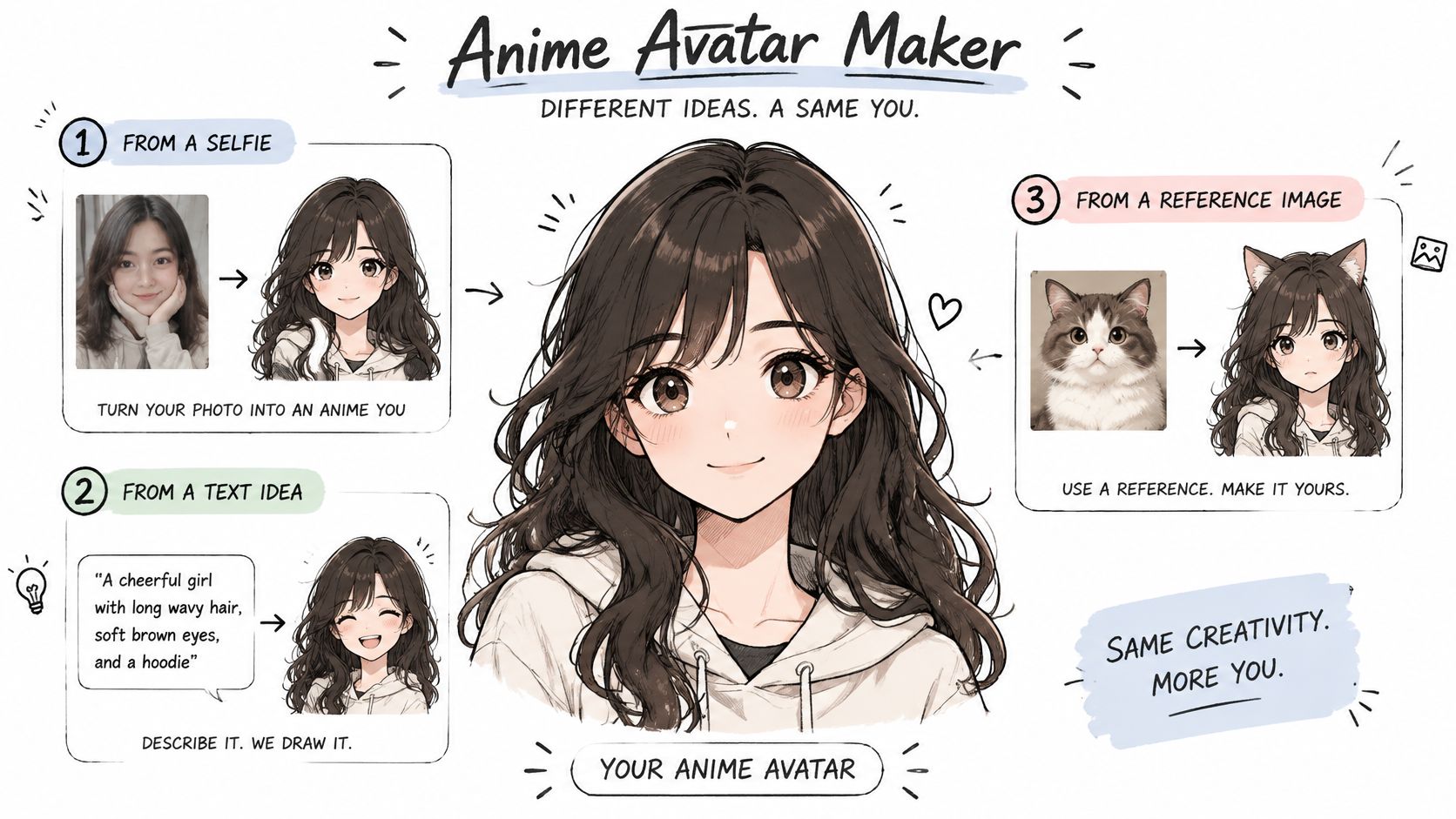
Typical results use large expressive eyes, simplified hair shapes, clean outlines, and flat shading. Those choices survive shrinking better than fine photographic detail does. Hair silhouette and one bold outfit color do most of the recognition work once the image is tiny.
That format suits specific jobs. TikTok creators use it for a trend look they can repeat, gamers want a profile or party portrait, and indie authors sketch a character before commissioning cover art. Etsy sellers test merch designs without paying for final art first, while marketers need one face that repeats across a campaign. The audience is broad because, according to the Association of Japanese Animations, the global anime market reached ¥3.8407 trillion in 2024, a 14.8% increase from 2023.
Decide that before you generate anything. Anime styling makes an avatar more playful and easier to read as a fan identity, but it also moves the face away from your actual appearance. If you want a likeness, you'll protect skin tone, face shape, and accessories. If you want a character, you can push hair, eyes, and outfit much further.
Practical rule: If someone who knows you couldn't pick the avatar out of a lineup, you've made a character, not a likeness. Both are valid, but don't judge one by the other's standard.
If you're starting from words alone, go to the prompt template next. If you already have a finished image you're happy with, skip ahead to the export sizes.
Prompt order matters because early words usually carry more weight. Put subject and framing first, the identifying traits in the middle, and style words last. If you bury your subject under rendering terms, you'll get a pretty image of the wrong person.
| Slot | What to specify | Example value |
|---|---|---|
| Subject | Adult or young adult, gender expression as you want it shown | adult woman, early thirties |
| Framing | Crop of the figure | head-and-shoulders bust portrait |
| Hair | Length, colour and style | shoulder-length black hair with bangs |
| Eyes | Colour and shape | large brown eyes |
| Outfit | One garment and one main colour | navy hoodie |
| Expression | One emotion only | calm, slight smile |
| Background | Plain colour or simple setting | plain pale teal background |
| Style | Rendering words, kept last | clean cel shading, soft lighting |
Copy that structure into a text file and treat it as your master. If you want more slot ideas for recurring characters, this guide to building an anime character template you can reuse works well as a companion. Don't rebuild the prompt from memory each session, because small wording changes produce a different face.
Here's the table put together as a single prompt you can paste and edit.
head-and-shoulders bust portrait of an adult woman in her early thirties, shoulder-length black hair with bangs, large brown eyes, navy hoodie, calm expression with a slight smile, plain pale teal background, clean cel shading, soft lighting
Notice what's missing. There's no jewelry list, no scenery, no second outfit, and no mood adjectives stacked three deep. Each slot gets one clear job.
Eight to ten descriptors is a workable ceiling for a first pass. Past that, traits start dropping out, and you won't know which addition pushed out the hair color or the glasses. When you need to cut, remove decorative words first. Keep anything that identifies the person, such as hair, eye color, a distinctive accessory, or the main outfit color.
Describe traits rather than naming a franchise or copying a costume. "Long silver hair, red jacket, gold earring" gives the model something original to build and gives you fewer rights questions later. A named character pulls in someone else's design, and the output tends to look like a knockoff even when it's technically different.
Save every version you test. Change one slot per test and log which change caused which result in a simple note, even just "v3, changed background only, hair shifted." That log sounds tedious until you're trying to reproduce a face you liked three weeks ago. I would rather spend two minutes logging than an hour regenerating blind.
A strong anime avatar should stay recognizable beyond the first image. Build it from a clear reference, approve one version as the identity anchor, and use that image to check every later variation.
The visual summary shows the sequence at a glance.
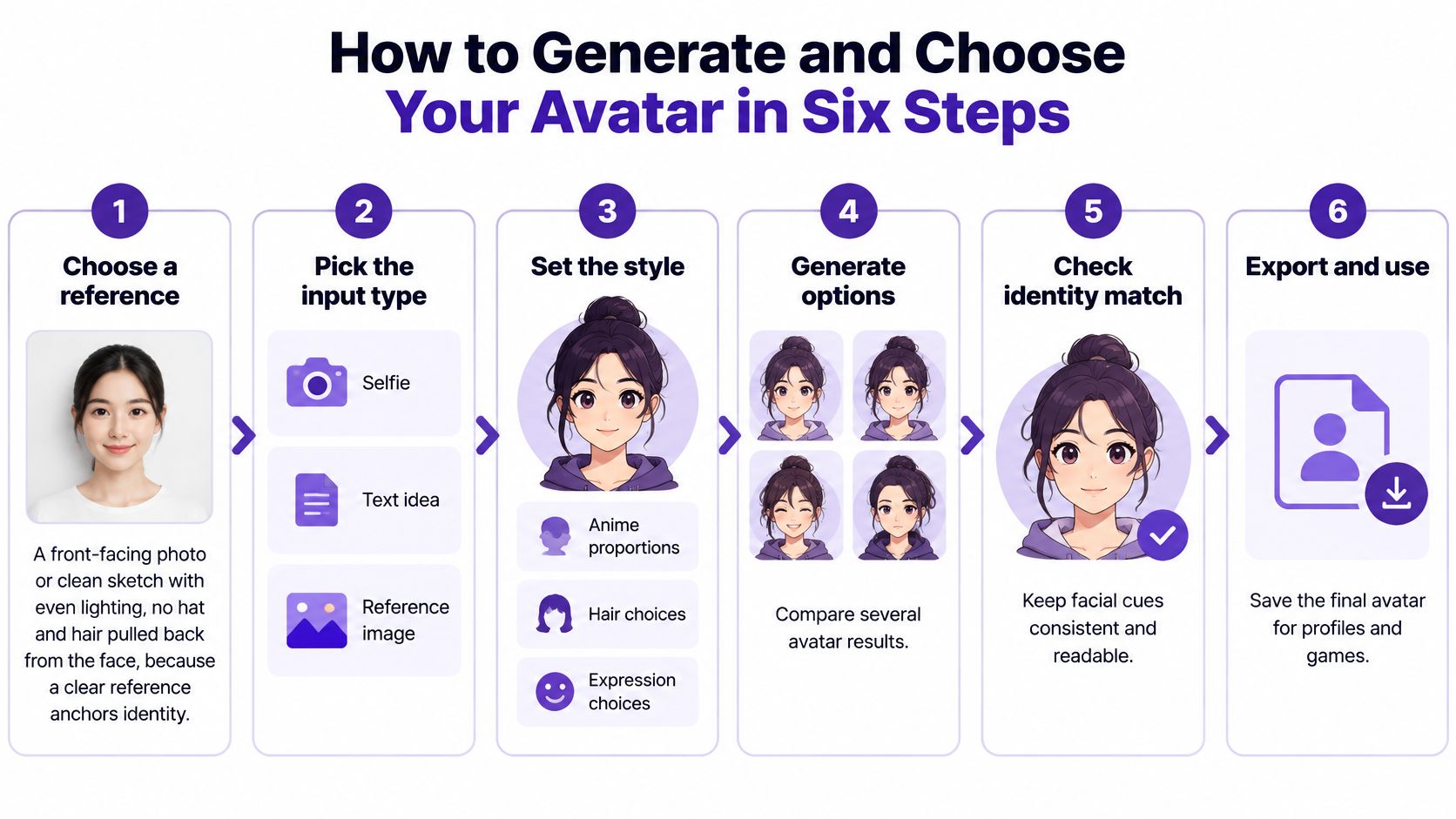
The sequence follows a practical method described in research on identity preservation and stylistic transformation: begin with a clear reference, define attributes such as hair, eye color, clothing, expression, pose, and background, then compare outputs for identity, attribute fidelity, and visual artifacts. The research uses image-similarity measures such as CLIP-Image and DINOv2. For a creator's day-to-day selection, placing candidates beside the reference makes those differences easier to judge directly.
Keep the initial prompt modular. When it includes too many details, relationships between attributes can become harder for the system to maintain. Check each required trait on its own, and add a prop or setting only after the plain bust meets your identity checks. That keeps the approved reference useful as a repeatable identity asset, rather than a one-off image.
This walkthrough shows the generation and selection flow.
Finish by placing the approved avatar beside the original reference at the same size. Compare the face and defining traits side by side. If they no longer match, regenerate from the original reference instead of building further edits on a drifting face. Use the approved image as the checkpoint for later posts, streams, and product listings.
Change one lever per pass. That's the rule that protects identity. Expression, head angle, and pose each need their own edit, otherwise you can't tell which change moved the face, and you'll fix the wrong thing.
Use your approved bust as the reference for every variation. State the features that must stay the same in the prompt itself, such as eye color, hairline, glasses, or a hearing aid. Models change unstated details, especially accessories and skin tone, so name what you're protecting.
| Feature | How to phrase it | What to check |
|---|---|---|
| Eye colour and shape | large round eyes, amber irises | both eyes match in size and colour |
| Hair | shoulder-length silver hair, side part | part and length stay the same across variants |
| Expression | soft smile, eyes half-closed | brows and mouth move together, no extra teeth |
| Head angle | head turned three-quarter | ears and jawline stay symmetrical |
| Pose | bust, one hand near the chin | finger count and hand shape |
| Accessories | round glasses, thin silver earring | present in every variant, same frame and colour |
Keep pose simple. A bust with the head turned three-quarter or one hand near the chin gives you variety without inviting defects. Full-body action poses with hands, weapons, instruments, or another character raise the defect rate sharply, and they don't help a profile avatar anyway.
For a deeper method on holding a design steady across many generations, see this overview of character consistency techniques for AI images. If you're extending the same character into motion, ClipNova AI has a useful tool to keep characters consistent in AI videos, which pairs naturally with a locked still reference.
If two edits in a row shift the jawline, hairline, or skin tone, stop. Regenerate from the approved reference instead of stacking more fixes on a face that's already drifting.
Stacked edits compound. Each pass reinterprets the last one, so a small hairline shift becomes a different forehead, then a different person. Going back to the approved reference costs one generation and saves the identity.
Test your settings before you publish a template for others. Run the same prompt structure across several skin tones, lighting setups, face shapes, and gender expressions. Identity fidelity isn't even across people, and a template tuned on one face can flatten someone else's features into a generic template. Catch that in testing, not in your comments.
Create a square 1024 by 1024 pixel master first, then export smaller versions from it. That single habit saves more rework than any platform-specific trick. You'll always have a clean source to recrop when an app changes its layout.
Keep the face in the central area of that square. Most platforms crop profile pictures into a circle, so corners disappear and anything near the edge gets cut. If your hair or an earring carries the identity, pull the framing in until those details sit safely inside the circle.
Use PNG for flat color and sharp outlines, which suits anime line art and plain backgrounds. Use JPG when the output has soft gradients and file size matters more than crisp edges. This breakdown of aspect ratios for social media platforms helps when you need banners or thumbnails alongside the profile crop.
| Platform | Format | Notes |
|---|---|---|
| X (Twitter) profile | PNG or JPG | Circular crop, keep the face centred |
| Discord avatar | PNG or JPG | Displays small, so keep the face large |
| Instagram profile | PNG or JPG | Circular crop |
| TikTok profile | PNG or JPG | Circular crop, very small display |
| Twitch profile | PNG or JPG | Use a clean background for contrast |
| YouTube channel | PNG or JPG | Keep key details away from the edges |
| Steam avatar | PNG or JPG | Displays very small, favour bold shapes |
Platform specifications change without much notice. Check the current requirement inside the app before you upload, rather than trusting a saved size from last year. Your square master makes that adjustment a two-minute export instead of a regeneration.
Shrink your master to roughly 64 pixels, about the size of a chat icon, and look at it without zooming. Eyes, hair shape, and outfit color should still read instantly. If the face turns into a pale blur, increase contrast, simplify the background, or crop tighter.
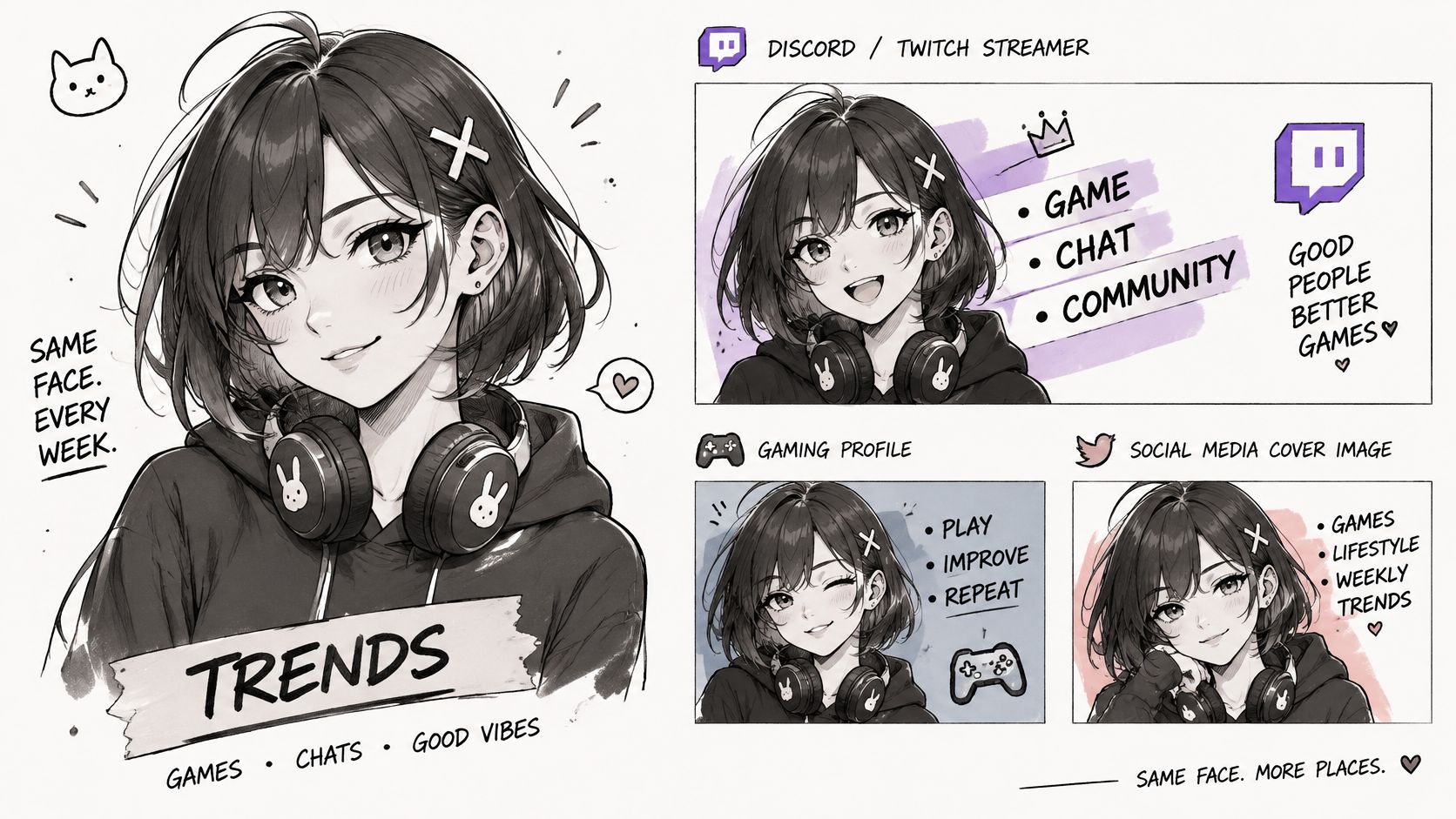
Say you're a streamer who needs the same character on Twitch and Discord. Export the square master once and keep two crops, one tight on the face for small chat icons and one including the shoulders for banners and panels. Same reference, same colors, no new generation. That's the identity asset approach doing its job.
Say you're a TikTok creator posting a weekly trend look. You need one face reused in every thumbnail so followers recognize the account mid-scroll, before they read your name. A fresh generation each week, however pretty, breaks that recognition and forces your audience to relearn you.
This example shows one character carried across streaming, gaming, and social layouts without redesigning the face.
Anime profile pictures work as social signals, not decoration. A cultural and technology analysis of anime avatars as identity markers reports that anime avatars have become a signifier on mainstream platforms including Twitter, Discord, and Instagram, with communities forming around the shared aesthetic. That means your hair shape, accessories, and outfit color aren't styling details. They're the signal itself, and they must survive downsizing.
So pick one approved avatar per identity and reuse its reference. Generate variations for a new pose or seasonal outfit from that reference, not from a blank prompt. I would rather see a slightly plain avatar repeated for six months than six gorgeous strangers in six weeks.
Free doesn't mean commercially usable. That's the assumption most guides skip, and it's the one that causes trouble for Etsy sellers, indie authors, marketers, and tabletop creators. A homepage saying "free" tells you the price. It doesn't tell you whether the output can go on a book cover, a paid download, apparel, an advertisement, or client work.
Licenses draw those lines differently. The Avachara help page on permitted avatar use shows the pattern clearly, since Avachara permits personal communication and profile-picture use while requiring a license for corporate or product advertising. Read the specific intellectual-property and commercial-use terms for the tool you're using, not the marketing claims on its homepage.
| Question | What to look for | Red flag |
|---|---|---|
| Who owns the output? | Ownership clause and any exceptions for third-party rights | Ownership claimed alongside a broad perpetual license kept by the platform |
| Is commercial use allowed on the free tier? | Named uses such as merchandise, paid downloads and advertising | Only personal use listed, or commercial use requires a separate license |
| Does editing or upscaling change the rights position? | Terms covering derivative works and modified outputs | Silence on edits, or a platform license over modified assets |
| Does the result resemble an existing character? | Costume, name, facial features and pose compared with the source | Distinctive costume or franchise identifiers carried into the prompt |
Start from the license terms themselves. A typical avatar-service EULA grants a limited, worldwide, non-exclusive license for personal, educational, professional, and commercial final productions such as games, advertising, apps, and client projects, with no per-render or per-project fee. Another policy may say you own your outputs while the platform keeps a perpetual, royalty-free, sublicensable license to host, modify, and reuse your uploads and generated assets for training and marketing. Those are very different deals hiding under similar homepage language.
Read both the ownership clause and the license clause before the avatar goes on merch, paid downloads, or client work. Ownership with a broad platform license still lets the service reuse your character in its own marketing. If that character is your brand mascot, that clause matters more than the word "own."
A broad anime aesthetic isn't the same as copying a character. Genre conventions such as large eyes and cel shading are general tools. Distinctive costumes, names, facial features, and signature poses are where practical infringement risk starts, so keep franchise identifiers out of your prompts. No tool can guarantee you a copyright-safe result, and you shouldn't trust one that does.
Check what happens to your uploads before you submit a selfie. Look for how long images are stored, who processes them, and whether they're used to improve models.
Don't upload images of children, clients, or team members without written consent. Their face isn't yours to put into a training or marketing license. If a policy doesn't state retention or deletion terms clearly, treat that silence as your answer and use a text-only prompt instead.
Once your checks pass, the build is straightforward. Take your approved reference, run the prompt template through the six steps, export the square master, and check the platform table before posting. You'll have an avatar you can reuse with confidence, not a folder of attractive strangers.
Ready to build an anime avatar you can reuse across TikTok, Discord, Twitch, and your next product listing? starryai turns a selfie, text prompt, or reference image into profile-ready anime visuals in seconds, so you can lock one approved face and generate every variation from it.


.svg)